Restaurant
Your restaurant overview and this week
See the next reply, agreed crops and the next delivery in one place.
Watch the walkthrough · 0:43
See your restaurant's next move
Narrated demonstration. Use Play, pause or replay at your own pace. Use fullscreen for small details. The written steps below remain available.
Download video: See your restaurant's next moveRead the transcript
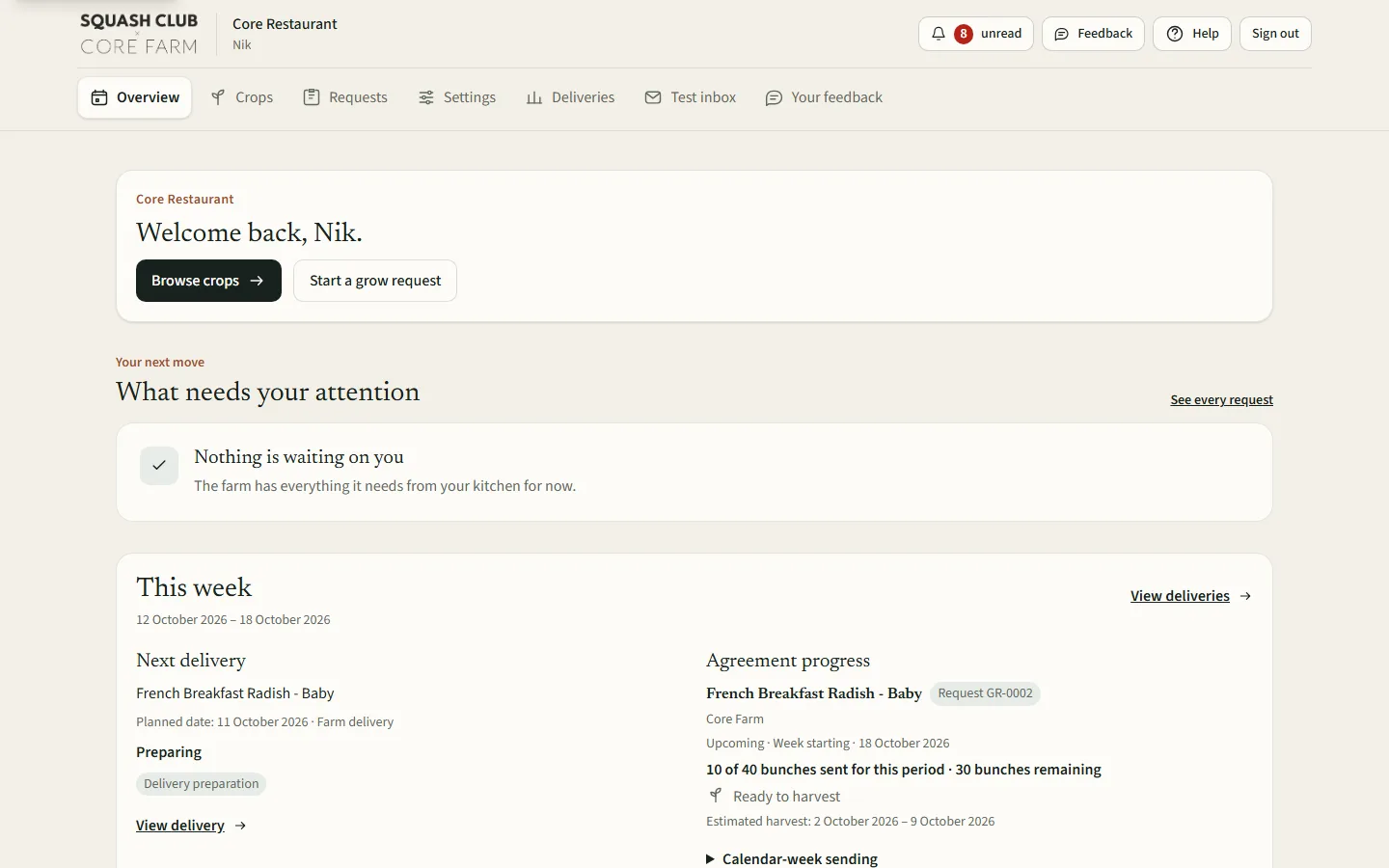
Your overview brings the growing programme together. Check What needs your attention and open Review and respond when the farm needs an answer.
Drafts are still in your kitchen. With the farm means awaiting its work or answer. Open an agreed growing programme to follow its progress, or browse crops to plan your next request.
This week separates agreed, sent and remaining amounts for the relevant period. Repeating periods follow the agreement's first needed date, while calendar-week sending is shown separately.
Next delivery or collection shows published preparation and shipment progress. A planned date is still a plan. Use the full request list, grow log and conversation for older work or a question.
Jump to a section
Find your next move
- Open Overview after signing in as a restaurant user.
- Check What needs your attention. Open Review and respond when the farm is waiting for an answer.
- Open a growing-programme card to follow an agreed request. With the farm lists work awaiting the farm; Draft requests are still in your kitchen.
- Use Browse crops for menu ideas, Start a grow request to begin, or See every request for the complete list.
Example
The farm proposes weekly basil. Its attention card takes a restaurant manager to the proposal; an agreed lettuce card takes you to its progress.
Read This week
Agreement progress shows each relevant period's agreed amount, amount sent and remaining balance, alongside growing stages and estimated harvest dates.
Next delivery or Next collection shows a preparation or sent delivery awaiting handover. A planned date is still an estimate; a sent status says produce has left the farm.
Open Upcoming growing milestones to see planned sowing and harvest estimates. Use the grow-log or conversation links for the full record.
Example
If 6 of 10 heads are sent for the selected weekly period, 4 remain for that period. A separate next-delivery card may show those 4 being prepared.
Period totals and calendar-week totals
A repeating agreement follows periods anchored to its first needed date. Those periods need not begin on Monday.
Calendar-week sending is folded separately and means what actually left the farm Monday–Sunday. A late shipment can be sent this week while fulfilling an earlier agreement period.
One-off agreements show lifetime totals. Remaining agreement quantity is not measured harvest stock and does not prove another delivery is already planned.
Unavailable notices identify information that could not be loaded. Check the full grow log or deliveries before relying on incomplete totals.
When your account is new
Begin with the crop library. Browse the farm's published products, then ask for the amounts and dates your menu needs.
Nothing waiting on you means no current reply is requested; it does not mean every crop is already agreed or delivered. The overview previews a small number of records, so use the full request list for older or additional work.
See the screen
Reviewed 2026-10-12. This is a guide to current behaviour; the app may change. Actions depend on your permissions.