Map & planting
Plantings: record what actually happened
Follow a crop's dates, field events and saved assumptions without confusing reminders with records.
Watch the walkthrough · 0:53
Record what happened to a crop
Narrated demonstration. Use Play, pause or replay at your own pace. Use fullscreen for small details. The written steps below remain available.
Download video: Record what happened to a cropRead the transcript
Open Plantings or choose a crop from its bed or scan location. Check the crop, bed, sowing date and status before recording work.
Review Grown for, saved assumptions and the timeline. Estimated harvest is a range, while actual milestones record completed work. A location label identifies the crop but does not split its field record.
Use Record what happened for sowing, watering, inspection, readiness or other offered events. Enter the date it actually happened and any useful private note. Save and check the resulting timeline and stage.
A field milestone does not add measured stock. Use Harvest for usable quantities and an eligible agreement for a shared photo or update. Ordinary field notes stay private. After an uncertain save, check the timeline before repeating it.
Jump to a section
Open the right planting
- Open Plantings, select a crop from its bed, or scan a verified location label.
- Check the crop, bed, sowing date, status and expected harvest range.
- Review Grown for, saved assumptions and the timeline when you need its commitments or earlier work.
Example
Two patches of the same lettuce may have different sowing dates and restaurant commitments. Check the bed and readable crop name, using the planting reference when you need to distinguish their records.
Plans and forecasts
The planting list highlights upcoming sowing and retains completed history. Saved plans groups the patch allocations into their planning record.
If an older link's planting reference is shared by more than one field, choose the crop using its field and bed. New plans and the Plantings list link directly to the exact record.
Estimated harvest is a range based on the saved assumptions, rather than measured stock. Farm overrides keep their recorded reasons.
Field-record controls need planting-update permission. Viewing a crop does not itself grant permission to record work.
Record a field event
- Choose Record what happened and select the event.
- Enter the date it actually happened, with an optional private farm note.
- Save and check the timeline and resulting crop stage.
Example
Record Watered for today's work. Record Germinated when the crop is actually growing; the event can close its germination reminder and start routines anchored to that stage.
Available events and valid stages
Events include Sown, Germinated, Inspected, Thinned, Watered, Treated, Ready to harvest, Harvest started, Harvest finished, Failed and Just a note.
Actual dates cannot be in the future. The server checks chronological and stage rules; read the error rather than forcing an impossible sequence.
Sowing, germination and readiness move the crop through its growing stages. Harvest started supports continued picking; Harvest finished ends harvesting rather than merely recording one pick.
Finished or failed plantings stop relevant future routine work. A failure does not erase the agreement or its history; report its customer impact separately.
Separate field work, stock and customer updates
Relevant milestone names and dates appear in the linked restaurant grow log. Private field notes and ordinary watering, inspection or treatment activity are not automatically shared as customer messages.
Record measured usable produce in Harvest before preparing a delivery. A harvest event, task tick or expected yield does not create stock.
For a customer-facing photo or explanation, open the eligible linked agreement and make a growing update. The current app does not provide a separate farm-only planting photo store.
Using a shelf or a failed save
A selected rack level identifies where the planting is located. Its event still updates the whole planting, rather than only the selected shelf's share.
After an uncertain save, check the crop timeline before recording the same milestone again. Keep unfinished notes open when correcting validation or connection errors.
See the screen
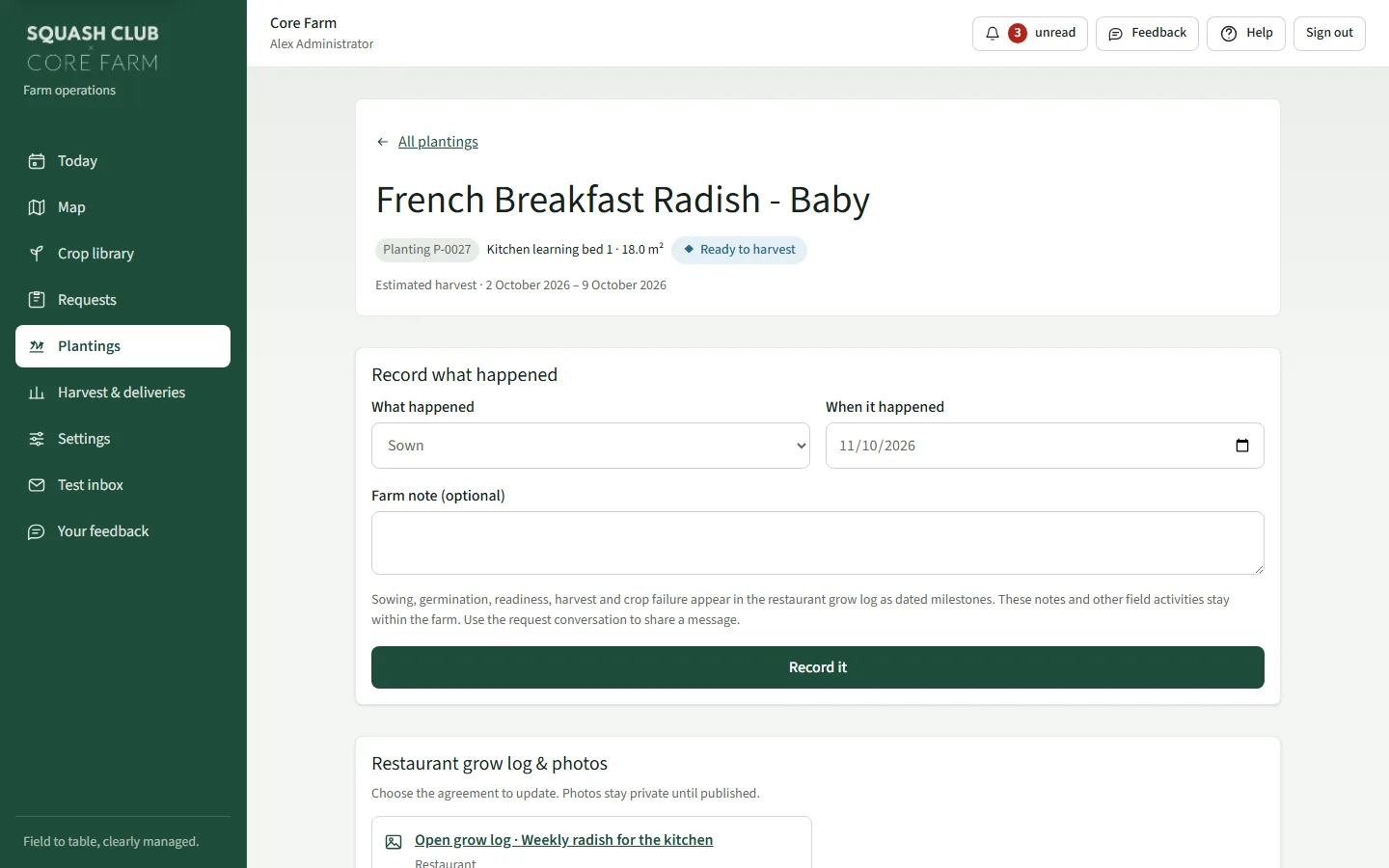
Reviewed 2026-10-12. This is a guide to current behaviour; the app may change. Actions depend on your permissions.