Restaurant
Browse crops and choose the right product
Find what the farm can grow and start a private request from a crop.
Watch the walkthrough · 0:47
Choose a crop for your menu
Narrated demonstration. Use Play, pause or replay at your own pace. Use fullscreen for small details. The written steps below remain available.
Download video: Choose a crop for your menuRead the transcript
Browse Crops for the products the farm offers. Search by plant, variety or edible part, and choose a category if useful. Clear filters when you want the full list again.
Choose Details to check what you get, ordering units and growing guidance. Different parts or forms can be separate products, so choose the one your menu needs.
Growing days run from sowing, not from sending your request. Season labels and established-plant guidance are forecasts, not measured stock or a guaranteed delivery date. Discuss experimental crops before relying on them.
Start a request with the crop when ready, then choose your own amount and dates. Use Other to suggest a format for farm review, or ask about a missing crop. The request does not edit the private farm library.
Jump to a section
Find a crop
- Open Crops. Search by a crop, species, variety or edible-part name, and choose a category if useful.
- Results update as you type. Use the search clear button to remove the entered name, or All categories to remove the category filter.
- Choose Details for the product you want. Crops are grouped by species; different edible parts or forms can be separate products.
- Check What you get, the usual ordering units, growing-time estimate and season information.
- Choose Start a request with this crop. Give the request a useful name, then complete its private draft.
Example
Choose carrot roots for a root course and carrot tops for garnish. A shared species name does not mean the same supplied product or unit.
Read timing and season labels
Ready in a range of days is estimated growing time from sowing, not from the day you send the request. Weather and season can change it.
Cut as needed describes established plants rather than a new sowing. Ask what amount the farm can supply; it is not a stock guarantee.
In season now or Expected from describes a usual annual harvest window. Harvest stock and confirmed delivery arrangements are separate.
Experimental means the farm has labelled the crop as a trial. Discuss uncertainty before depending on it for a menu.
Example
A crop with a 21–28 day estimate is not promised for 21 days after requesting it. The farm must review, schedule and grow it.
More detail or a missing crop
Open About this crop for its species or variety description. How it is ordered lists supported units, the usual unit and any size guidance.
No matching crops means the search or category has no result; choose Clear filters. An empty catalogue means the farm has not published requestable crops yet.
Ask the farm about something not listed. Restaurant users cannot edit the private crop library, its yields or farm spacing assumptions.
A different supplied format
When adding a request line, Other lets you suggest a different unit or format. It remains flagged for farm review and does not create a library product or assume a conversion.
For example, 'small trays' needs the farm to establish what product, unit and reviewed amount that means before agreeing or planning it.
See the screen
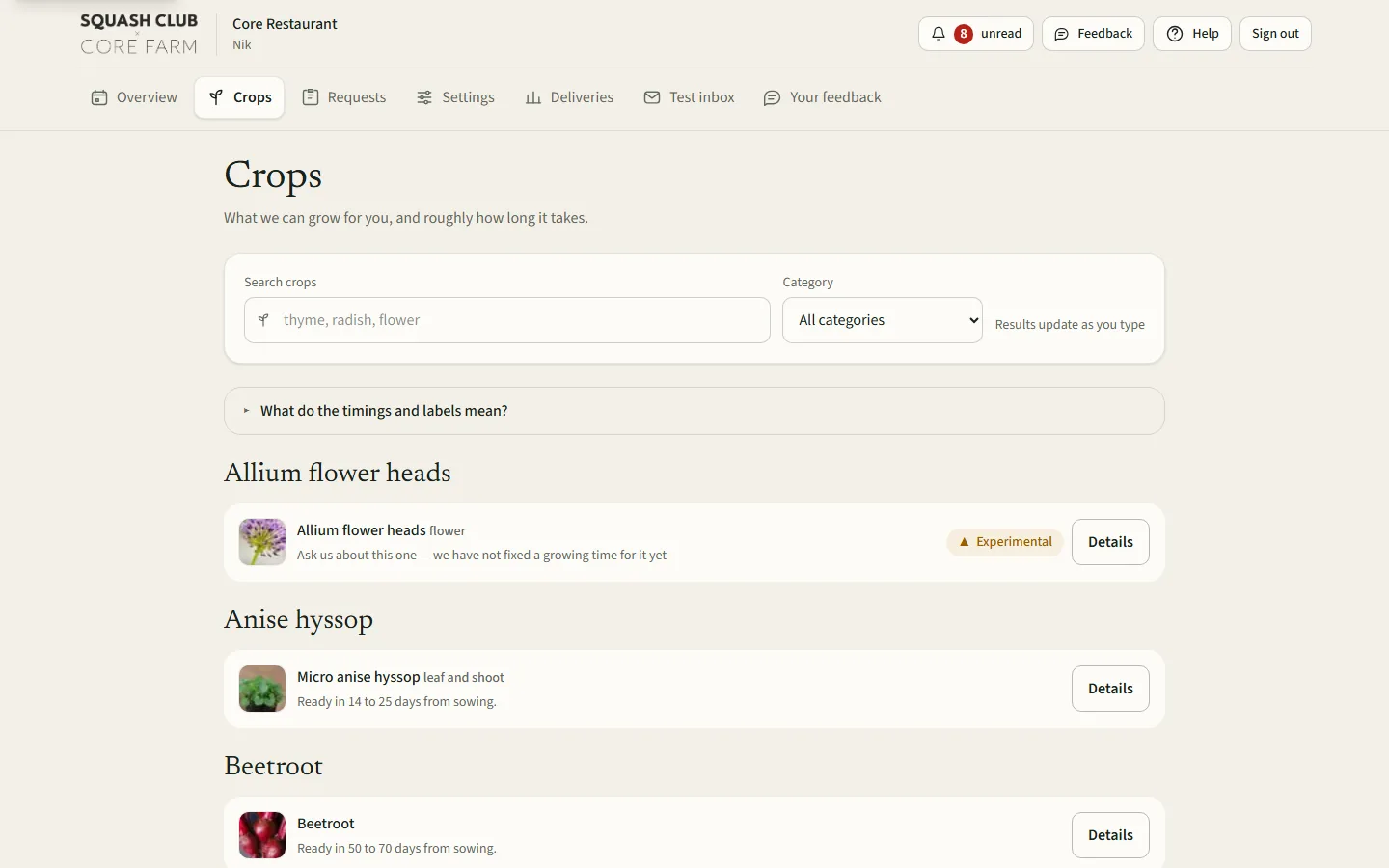
Reviewed 2026-10-11. This is a guide to current behaviour; the app may change. Actions depend on your permissions.