Requests
Grow requests: review, agree and handle changes
Give each restaurant a clear answer, review unusual units and keep shared issues separate from private notes.
Watch the walkthrough · 1:05
Review and agree growing requests
Narrated demonstration. Use Play, pause or replay at your own pace. Use fullscreen for small details. The written steps below remain available.
Download video: Review and agree growing requestsRead the transcript
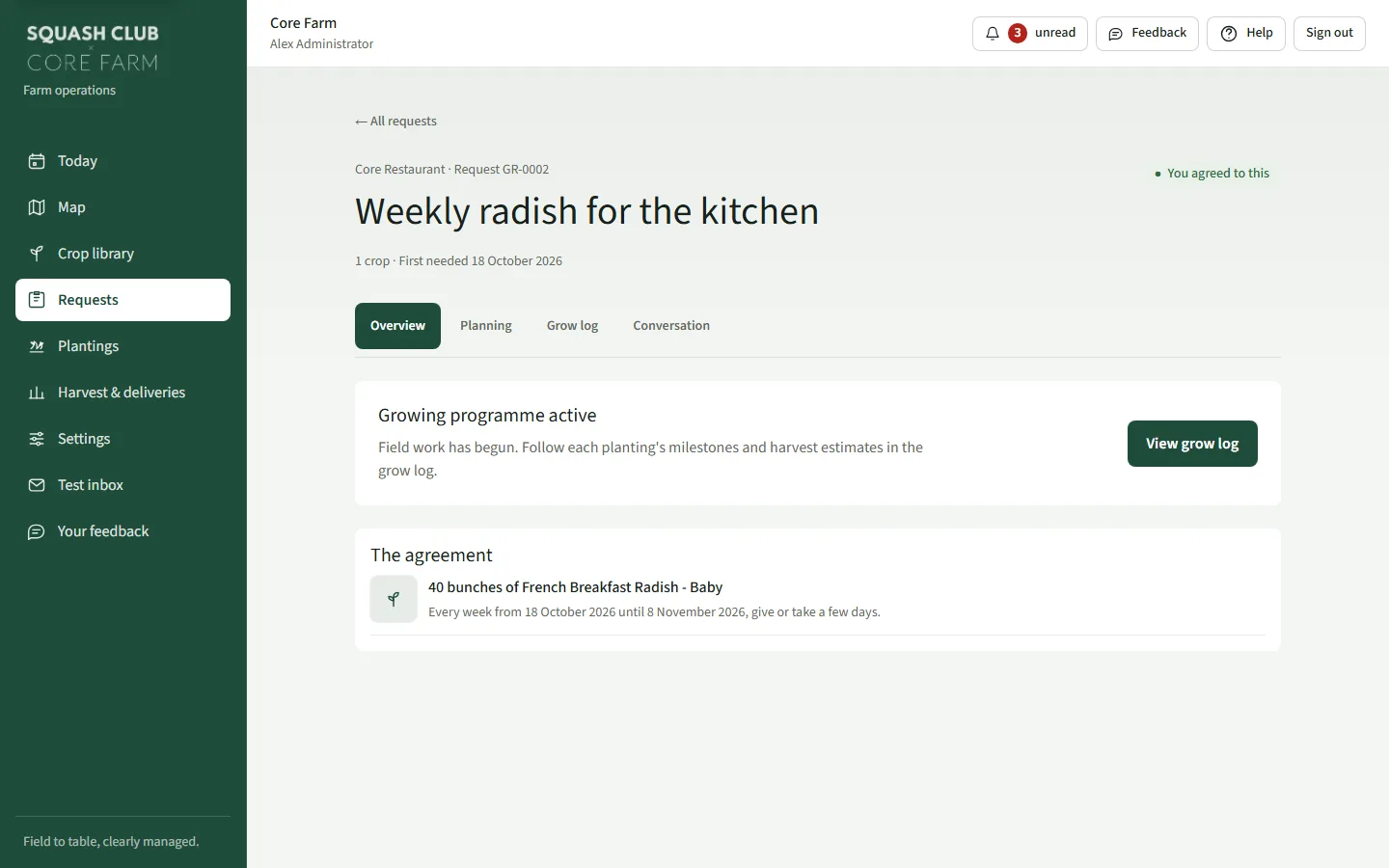
Open Requests and pick up a request when a reviewer is needed. Check crops, amounts, units and dates. Farm approval agrees the growing programme; it does not reserve beds or send produce.
Use Conversation when a detail is unclear. A question marked as needing a reply waits for the restaurant's answer. Ordinary messages can continue the discussion without changing that state.
An Other unit is flagged for farm review. Select the eligible product and approved unit, enter the reviewed amount and explain the decision. A suggested unit does not create a library product or conversion.
The farm can also draft a proposal for a restaurant. Build and check its crop list, then send it separately. The restaurant answers the outgoing proposal; adding a crop alone never sends it.
Use Changes and issues for delays or shortfalls, and separate agreement-change controls for revised quantities or dates. Record a reason; the restaurant is notified. Review affected plans, and keep shared conversations separate from private farm notes.
Jump to a section
Pick up and answer a request
- Open Requests and choose a request waiting for the farm.
- Pick it up when the workspace requires a reviewer. Check crops, amounts, units and first-needed dates.
- Ask a question in Conversation if something is unclear, or give the farm's answer when authorised.
- After agreement, open Planning to place the crop and Grow log to follow its progress.
Example
A chef asks for 10 lettuce heads each week. Agree the programme after reviewing its dates, then make one or more planting plans that supply it.
Ownership and agreement
Colleagues can read authorised requests, but review actions require the appropriate permissions and, where applicable, the current claim. Release your claim if someone else should take over; an authorised administrator can release a colleague's claim.
Farm approval is an agreement to grow, rather than a saved bed allocation or a shipment. Grow requests are separate from produce orders.
Questions marked as needing a reply put the request into its waiting-for-answer state. Ordinary messages keep the conversation going without necessarily changing that state.
Closed requests retain their conversation and history. Declined or cancelled requests do not have an ordinary reopen action.
Review a suggested unit
- Open the flagged crop when the restaurant suggested an Other unit.
- Choose the appropriate eligible library product and an approved unit. Enter the reviewed quantity explicitly.
- Explain the decision and save it before approving the agreement.
Example
The restaurant asks for 'two kitchen crates'. Discuss what a crate contains, then record the agreed amount in an approved product unit. The original suggestion stays in the history.
Avoid an invented conversion
The suggested wording is a review request, rather than a new recognised unit. The app does not copy its number into a different unit and pretend the conversion is known.
A library manager may need to add or revise the appropriate product or allowed unit before the review can be completed. Record the reviewed amount and reason so both parties can understand the decision.
Send a farm proposal
- Choose to start a proposal, select the restaurant and give the programme a readable title.
- Build its crop list in the draft, reviewing amounts and dates before sending.
- Send the proposal to the restaurant and follow its response in the request workspace.
- While a sent proposal is still open, an authorised proposer can choose Withdraw proposal in Overview.
- Give an optional reason, then choose Yes, withdraw it, or Keep proposal to leave it open.
Draft versus sent
Adding a crop to a draft does not send the proposal. Draft crops can be reviewed, changed or removed before the separate send action.
The restaurant answers a farm proposal. The farm does not approve its own outgoing proposal on the restaurant's behalf.
Accepted, declined and withdrawn proposals stay closed. Withdrawal is not available after a final decision.
Report a delay or change an agreement
- Open Grow log and Changes and issues for an agreed request.
- Report a delay, shortfall or crop problem with a clear explanation. Add a revised expected delivery range if useful.
- Use the separate agreement-change controls when the actual agreed quantity, dates or unplanted crop must change.
- Check the saved update and review affected planting and delivery plans. Resolve an issue when its outcome is known.
Example
For a one-off 40-head agreement with 10 already sent, changing the total to 30 leaves 20 to send. For a weekly agreement, its quantity remains an amount per week.
Consequences of a change
A shared issue notifies the restaurant but does not itself alter the agreement or crop plans. A resolution retains the original issue and records the outcome.
Authorised farm staff can revise an agreement with a reason and notify the restaurant; a second restaurant acceptance is not required for this workflow.
One-off totals include produce already sent. Repeating quantities apply to the agreement period, and dispatch history constrains changes to the delivery programme.
Crop substitution is restricted once planting history exists. A replacement crop after growing begins needs a separate appropriate agreement and plan.
Changed quantities do not automatically resize planted ground. Review reserved space, commitment amounts and future deliveries after changing the agreement.
Keep the right information in the right place
Conversation is shared with that restaurant. Farm notes are private to authorised farm staff. Grow log contains the shared growing and delivery journey.
Use the history to see decisions, changes and earlier messages; older entries may be folded. Keep explanations readable while retaining the record's reference for traceability.
See the screen
Reviewed 2026-10-15. This is a guide to current behaviour; the app may change. Actions depend on your permissions.